
Find the buyers hiding in your list
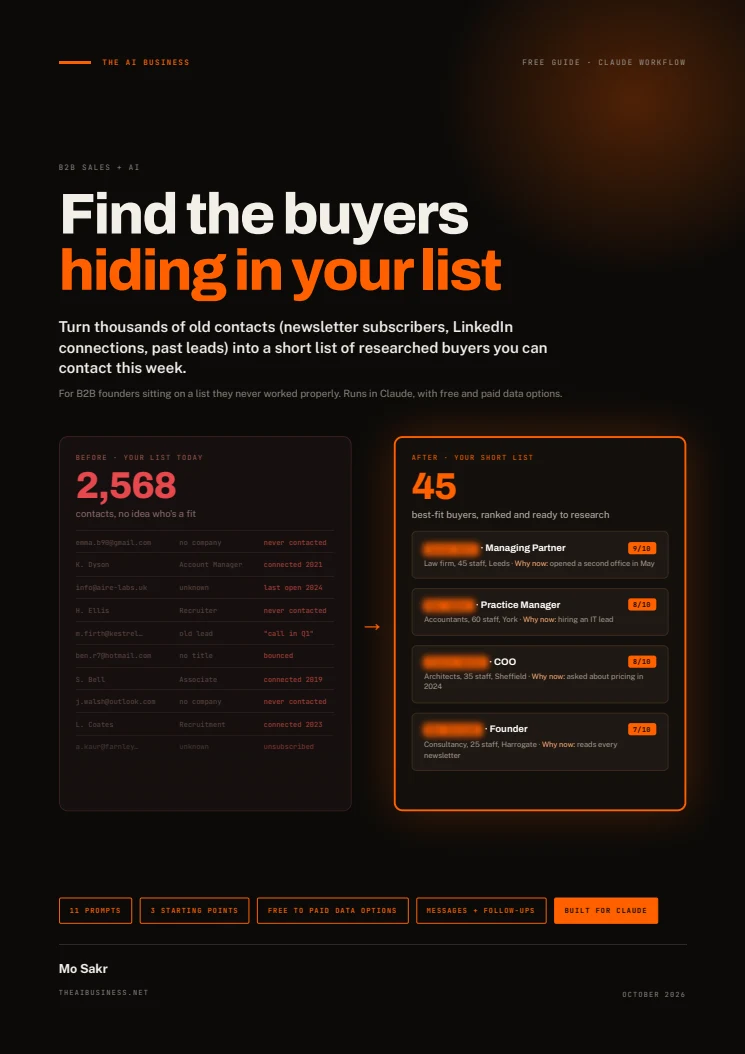
Your next buyers may already be among your newsletter subscribers, LinkedIn connections and old leads. This free 15-page guide helps B2B founders use Claude to clean those lists, score buyer fit and research a shortlist before preparing one-to-one messages.
Get free accessOpens here after signup. No email to wait for.
Open it here.
Enter your details once to read this guide. You can then open every guide, template and tool in this browser.
Free to use. No email to wait for.
Read the guide
Your guide is ready. Read it below or download the PDF.
About this guide
Start with the data you have: email addresses, names and companies, or richer LinkedIn profiles. Follow seven steps and 11 prompts to merge duplicates, remove opt-outs, filter unsuitable groups, sort companies, score contacts and research the strongest candidates. Optional data enrichment comes after the free filtering steps, so you only look up companies still worth considering.
Finish with research cards, a CRM import file, first-message drafts and dated follow-ups. A weekly review prompt helps choose the next batch. The guide demonstrates the process on a generated 2,568-contact list for invented company Fellgate IT; its example contacts, figures and messages are fictional, not client results or a promise of sales. Review the shortlist and edit every message yourself. A good fit or a newsletter signup does not establish buying intent or permission for sales outreach.
What's inside
Claude setup and three starting routes
A reusable Project brief and export instructions for newsletter subscribers, LinkedIn connections, old CRM records and event lists. Choose the route that matches the data you already hold.
Clean, merge and filter before researching
Use code to merge people across lists, remove duplicates and opt-outs, park unknowns and sort companies. Keep every exclusion in a separate file with its reason.
A transparent buyer-scoring framework
Score company fit out of four, role out of three and signals out of three. Split contacts into A, B and C tiers, then review the top tier yourself.
Optional enrichment and sourced research cards
Decide when missing company size, location or emails justify a data tool. Research ten shortlisted contacts at a time, with source links, confidence levels and unknowns left visible.
CRM imports, messages and a weekly routine
Prepare a CRM-ready CSV, draft first messages and follow-ups, handle replies and plan the next batch. Eleven prompts cover the workflow, including the optional enrichment prompt.
Who it's for
- B2B founders with newsletter subscribers, LinkedIn connections, event contacts or old leads they have not reviewed properly.
- Teams that know their target industries, company sizes, locations and buyer roles, or can define them in the supplied brief.
- People who can work with permitted list exports in Claude and review research and messages before taking action.
What you'll be able to do
- Combine scattered lists while preserving sources, opt-outs and the reasons for every exclusion.
- Prioritize contacts by company fit, decision-making role and actual engagement signals.
- Research a manageable batch with evidence, an opening angle and a confidence level for each contact.
- Prepare a CRM import and a weekly contact plan with message drafts and dated next steps.
Before you start.
How can I use Claude to find potential buyers in an old contact list?
Define your ideal customer and buyer roles, then upload your list exports. The guide walks through cleanup, group filtering, company sorting and scoring before researching the strongest candidates. A high fit score makes someone worth reviewing; it does not prove they want to buy.
What lists and tools do I need?
Start with newsletter subscribers, LinkedIn connections, old CRM contacts or event lists in CSV form. The guide is built for Claude with file handling, code execution and web search. It includes a reusable Project brief and routes for email-only lists, names plus companies and richer profiles. Check current Claude features and usage limits before starting.
Do I need a paid enrichment tool or a CRM?
Neither is required for every list. The guide explains when missing company size, location or work emails justify enrichment, and includes free and paid options. A spreadsheet can hold the final shortlist if you have no CRM. Vendor plans, prices and export menus can change.
Are the 2,568 contacts and 45 shortlisted buyers real client results?
No. The guide uses generated contacts for an invented company, Fellgate IT. The counts come from a test run on that fictional list, with a sample enrichment export. It also describes company-level research checks on three real firms. These are workflow demonstrations, not evidence of clients won or guaranteed results.
How do I get the guide, and does it send messages for me?
Enter your full name and email to read the PDF on this page immediately and download it. You also subscribe to The AI Business newsletter and can unsubscribe at any time. This browser remembers your access. The guide produces drafts and files; you review, import and send them yourself, respect opt-outs and check permission before outreach.