
Claude + Notion CRM
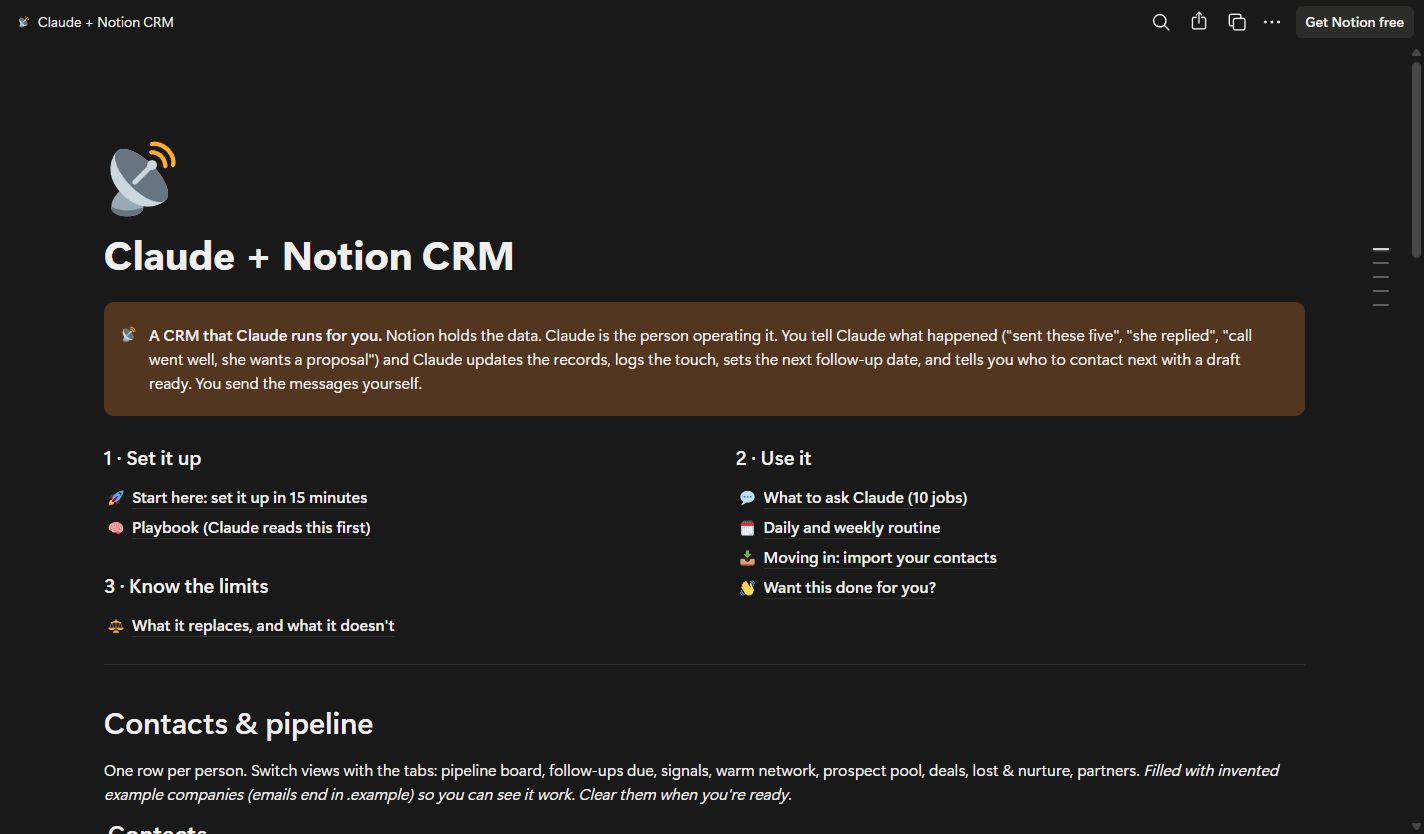
A free Notion CRM template for founders and solo sellers who want help keeping contacts, follow-ups and deal history up to date. Notion holds the records. You tell Claude what happened, and Claude helps update the CRM, prepare drafts and work out who to contact next. You send every message yourself.
Get free accessUnlock the template link here. Copy it in Notion. No email to wait for.
Get the template.
Enter your details once to get this Notion template. You can then open every guide, template and tool in this browser.
Free to use. No email to wait for.
Your Notion template
Your template is ready. Open it in Notion, then duplicate it into your own workspace.
Make it yours in Notion
- Open the template with the button above. The guide and example databases are public to read.
- Click Duplicate at the top right in Notion, then sign in and choose your own workspace.
- Open Start here in your copy. Connect Notion to Claude, paste the project instructions, and fill in the four marked Playbook sections.
- Try the invented examples before adding your contacts. Keep your real data in your own copy.
A Notion account is needed to save a copy. Running the CRM with Claude needs a Claude account and the Notion connector. Nothing is sent automatically.
Keep the pipeline current through a conversation.
Duplicate the template into your own Notion workspace, connect Notion to Claude, and follow the guide inside. It includes three linked databases, a playbook you can adapt to your business, example records and ten jobs to try in chat.
Nothing syncs or runs in the background by default. You report your activity and check what Claude logged. The included limits page explains the gaps: automatic email capture, sending, call recording, team reporting and consent tracking.
What's inside
Contacts and pipeline
One record per person, with stages, fit, priority, deal details and dated follow-ups. Saved views cover the pipeline, signals, warm network and more.
Activity Log and Connection Requests
A linked history of touches, a weekly scoreboard and a place to keep the reason behind each connection request.
An editable Claude playbook
Set your follow-up cadence, ideal customer profile, voice rules and offer. The guide includes project instructions to copy into Claude.
A guide to setup and everyday use
Setup steps, ten example jobs, daily and weekly routines, contact import guidance and an explicit explanation of the limits.
Invented examples to practise with
Example contacts, activities and connection requests let you see the workflow before adding your own data.
Who it's for
- Founders and solo sellers managing their own B2B pipeline.
- People using Notion and Claude who want a structured follow-up routine.
- Small businesses whose CRM needs centre on contacts, conversation history and the next action.
What you'll be able to do
- Copy the CRM into your own workspace and configure the playbook for your business.
- Ask Claude for follow-ups due, research-backed drafts and pipeline updates from your records.
- Log what happened after messages and calls, then review activity against your weekly targets.
Before you start.
Is this a PDF guide or a Notion template?
It is a duplicable Notion template. The setup guide, playbook, example prompts and routines are pages inside it, alongside the three databases. There is no PDF to download.
How do I copy it into my workspace?
Enter your name and email here to unlock the template link. Open it in Notion and click Duplicate at the top right, then sign in and choose your own workspace. Website signup also subscribes you to The AI Business newsletter.
What do I need to run it?
You need a Notion account to save your copy, plus a Claude account connected to Notion to use Claude as the operator. Follow the setup guide in your copy. Claude usage limits and any paid account or add-on costs are separate from the free template.
Does Claude send messages or sync my inbox automatically?
No. You tell Claude what happened and send messages yourself. The core workflow does not capture email activity automatically or run follow-ups in the background.
Can it replace a CRM for a sales team?
It is designed around founders and solo sellers. It does not provide a team CRM’s automatic activity capture, sending sequences, call recording, per-rep reporting or consent tracking. Read the limits page before using it.